--- title: "Build a Model Dataset" description: "Register a Dataset in Model Studio to assemble modeling data from the Data Elements and Features you already govern." ---
TL;DR
A Dataset combines registered Data Elements and Features into one governed modeling table. Open Model Studio → Datasets, click + New Dataset, set an Alias and Unique By, pick the Inputs, fill in the properties, and create.
## What is it? A **Dataset** is a registered object type that combines Tables and Features for downstream use, such as training or scoring. You build it in **Model Studio**, using the data catalog you established in Data Vault and Feature Engineering. Datasets are governed like Models. A Dataset has a status, goes through approval, appears in the Model Studio [Approval Queue](/user-guide/how-tos/use-the-approval-queue/), and can be shared. It is also simulatable: you can run a job on it, and the default reports for the Dataset object type are set in [Platform Settings](/user-guide/admin-guide/configure-platform-settings/). Once registered, attach a Dataset to a Model as its development data (Train, Validation, and so on), so approvers can see what the Model was built on. See [Register a Model Definition](/user-guide/how-tos/register-a-model-definition/). ## How to Register
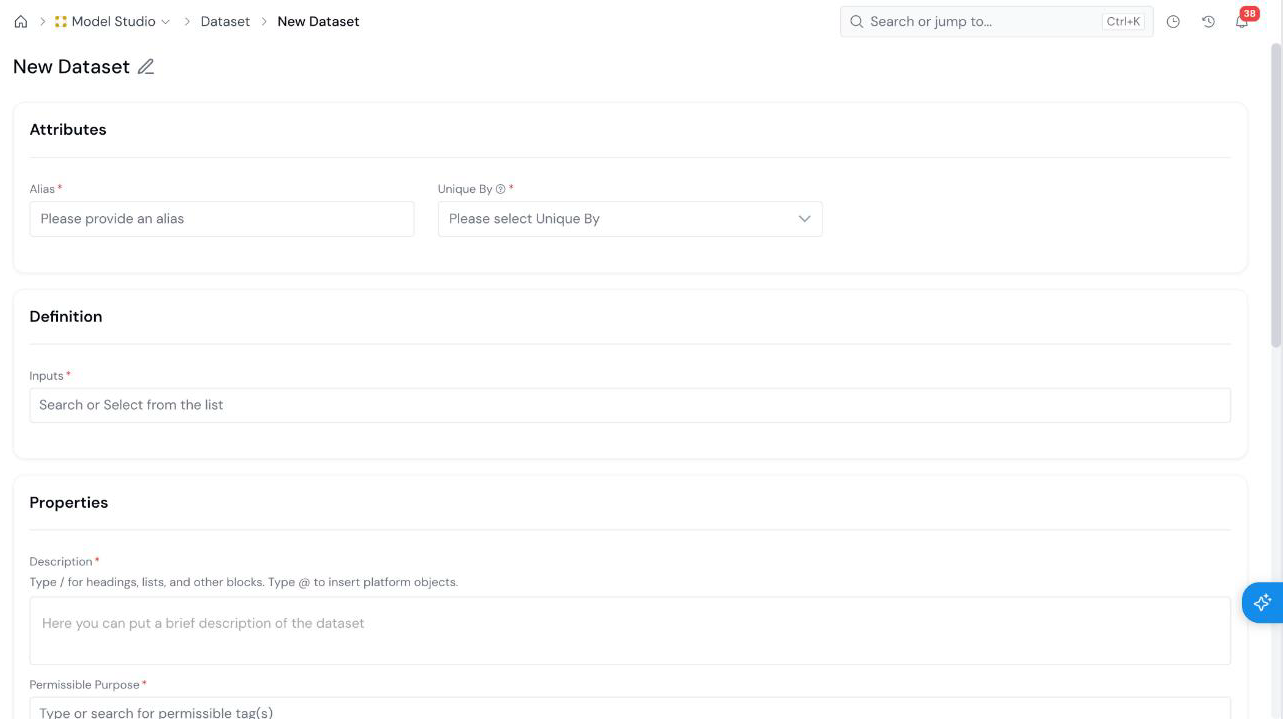
#### Open the Create Form On the **Model Studio → Datasets** page, click **+ New Dataset**. Use the search box and the **Status** filter on this page to find existing datasets. The form opens with an editable name at the top left (**New Dataset**). Click the pencil icon and type a descriptive name.
#### Set the Attributes New Dataset form with the Attributes section (Alias and Unique By), the Definition section (Inputs), and the start of the Properties section.
Field What it holds
Alias Required The name used to refer to the Dataset in code. See Common Registration Info.
Unique By Required The level each row of the Dataset is unique at. Pick from the list.
#### Pick the Inputs Under **Definition**, use **Inputs** \* to search for and select the registered objects that make up the Dataset.
#### Fill in Properties and Create Fill in the [Properties](/user-guide/how-tos/common-registration-info/#properties):
Field What it holds
Description Required What the Dataset contains and what it is for.
Permissible Purpose Required The purposes the Dataset may be used for.
Group Required The group the Dataset is filed under.
Keywords Optional tags that make the Dataset easier to find.
Click **Create** at the bottom right. The Dataset is saved as a draft.
## What's Next - [Run a Simulation](/user-guide/how-tos/run-a-simulation/) to run a job on the Dataset. - [Register a Model Definition](/user-guide/how-tos/register-a-model-definition/) and attach the Dataset as development data. - [Approve an Object](/user-guide/how-tos/approve-an-object/) to send the Dataset for review.