--- title: "Profile Data Quality" description: "Create a Quality Profile to run a first descriptive analysis on a registered DataTable before you build on it." ---
TL;DR
A Quality Profile runs an initial descriptive analysis on a registered DataTable. Open Data Vault → Quality Profile, click + New Quality Profile, pick the Data Table and, optionally, the Data Columns to profile, add a group and description, and create.
## What is it? A **Quality Profile** (often shortened to **QP**) is a registered object in the **Data Vault** module. Use it to conduct an initial descriptive analysis on a registered DataTable and gain deeper insight into your data before you register Data Elements and Features on top of it. A Quality Profile is a simulatable object: you run it as a job, and the reports selected for the Quality Profile object type in [Platform Settings](/user-guide/admin-guide/configure-platform-settings/) run by default. It can be shared with other users; see [Share an Object](/user-guide/how-tos/share-an-object/). An administrator can hide the Quality Profile page for a role while leaving Data Table and Data Element visible; see [Configure Roles and Permissions](/user-guide/admin-guide/configure-roles/). ## Before you start [Register the Table](/user-guide/how-tos/register-a-table/) you want to profile. A Quality Profile reads from a registered DataTable. ## How to Create
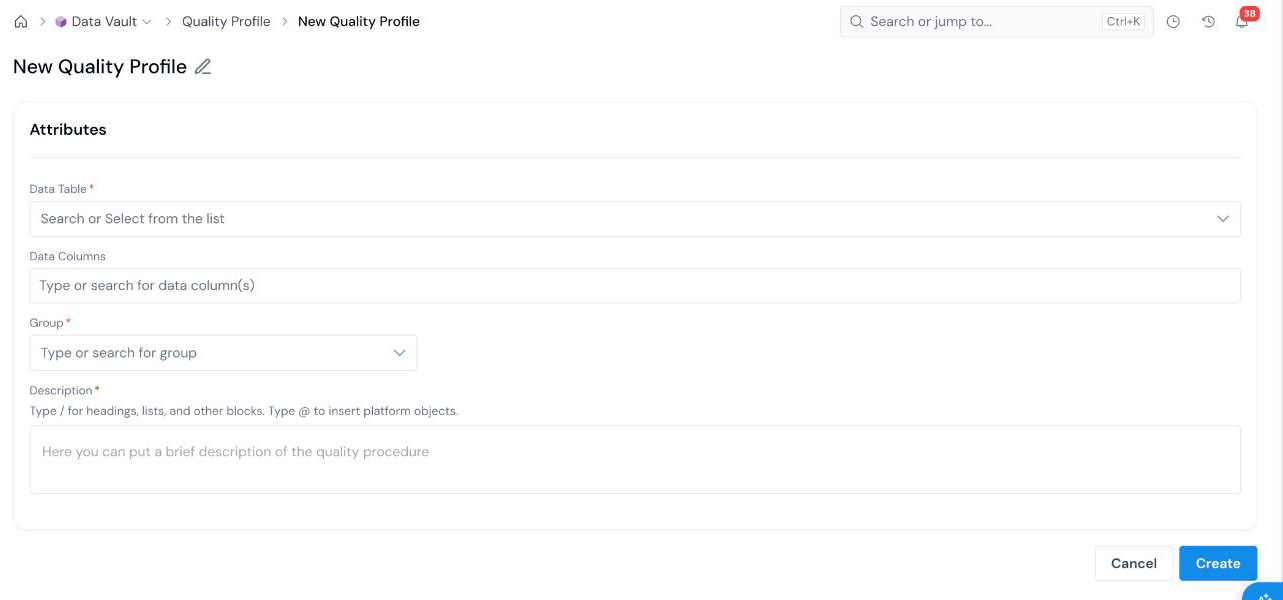
#### Open the Create Form On the **Data Vault → Quality Profile** page, click **+ New Quality Profile**. Click **Info** next to the page title for a short description of the page. The form opens with an editable name at the top left (**New Quality Profile**). Click the pencil icon and type a descriptive name.
#### Pick the data to profile New Quality Profile form with Data Table, Data Columns, Group, and Description fields.
Field What it holds
Data Table Required The registered DataTable to analyze. Search or pick from the list.
Data Columns The columns of that table to include. Type to search and select one or more.
Group Required The group the profile is filed under. See Organize Objects.
Description Required What you are checking and why. Type / for headings and lists, and @ to insert a link to another platform object.
#### Create Click **Create** at the bottom right. The Quality Profile is saved and you land on its details page.
## What's Next - [Run a Simulation](/user-guide/how-tos/run-a-simulation/) to execute the profile as a job. - [Understand Job Output](/user-guide/how-tos/understand-job-output/) to read the results. - [Register a Data Element](/user-guide/how-tos/register-a-data-element/) once you trust the columns.