

Technology
AI Architecture
Ask AI
How CORRA AI and Corridor MCP work together, how the MCP server runs, and how requests access Corridor data.
Corridor’s AI capabilities are provided by CORRA AI, the assistant built into the platform, and Corridor MCP, the server that exposes Corridor capabilities as tools for agents. See CORRA AI for what the in-product assistant can do.
Components
Section titled “Components”CORRA AI, Corridor MCP, and the Corridor platform are separate components that can be deployed and used independently.
- Corridor platform is the system of record. It owns users, workspaces, application data, files, and authorization. Its service layer remains the final enforcement point for workspace and object-level permissions.
- Corridor MCP is the governed programmatic access layer over Corridor. It authenticates MCP requests, establishes the Corridor user/workspace context, and exposes selected Corridor capabilities as MCP tools. It can be used by CORRA AI or directly by external MCP clients.
- CORRA AI is Corridor’s first-party agent experience. It provides the chat API and UI, conversation persistence, agent runtime, instructions, skills, LLM integration, and tool orchestration. Corridor MCP is one of the governed tool providers available to the agent.
- External MCP clients such as Claude Code or Cursor can connect directly to Corridor MCP without using CORRA AI.
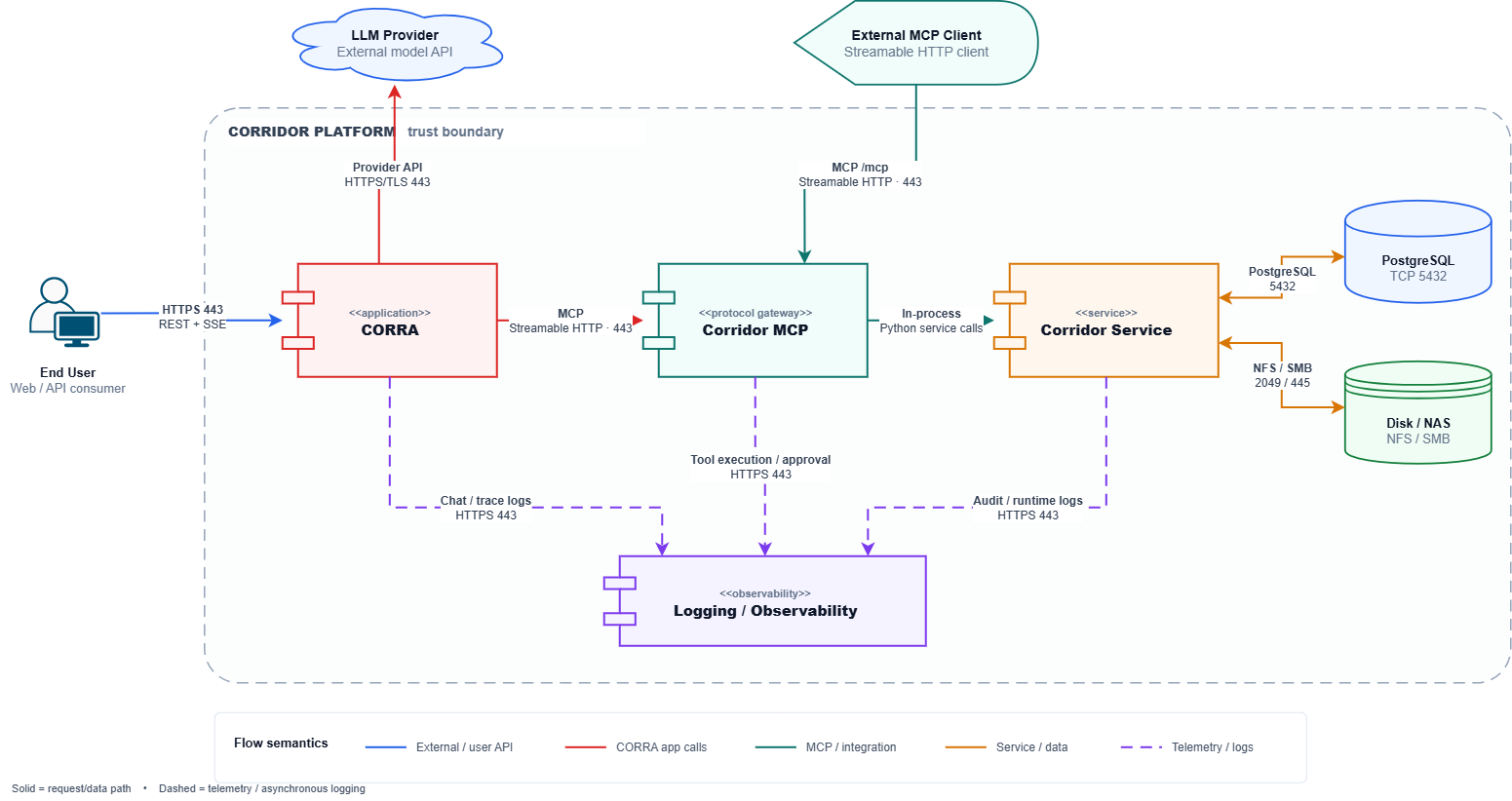
Communication protocols and encryption
Section titled “Communication protocols and encryption”| Connection | Protocol | Authentication / authorization | Security |
|---|---|---|---|
| Browser → Corridor | HTTPS; REST and Server-Sent Events for streamed responses | Existing Corridor session and authenticated user identity | TLS at the platform ingress |
| Corridor API → CORRA | HTTP/JSON and SSE within the server-side runtime environment | Scoped to the active Corridor user and workspace | Internal application communication |
| CORRA → Corridor MCP | MCP streamable-http at /mcp | Signed bearer token carrying user and workspace identity | Authenticated internal service communication |
| External MCP client → Corridor MCP | MCP streamable-http through the public reverse proxy | OAuth authorization flow and bearer access token | HTTPS |
| Corridor MCP → Corridor services | Direct in-process service calls | Authenticated AppUser context and standard Corridor authorization | No separate network hop |
| CORRA → LLM provider | Provider API | Provider-specific credentials | HTTPS/TLS |
| CORRA → observability platform | OpenTelemetry integration, for example Langfuse | Observability platform credentials | HTTPS in production deployments |
The in-product CORRA runtime and external MCP clients ultimately use the same governed MCP tool implementations. For CORRA, the user and workspace context comes from the authenticated Corridor session established through the institution’s configured SSO/authentication mechanism and is carried into the signed MCP credential. External clients establish their identity separately through the MCP OAuth authorization flow.
Corridor App server starts the MCP server and keeps it running alongside the application. This means the server stays warm between requests rather than starting a new process for every tool call. See Installing Corridor MCP for how an agent connects and obtains a token.
MCP token security
Section titled “MCP token security”MCP access tokens are signed JWTs containing the authenticated Corridor user, workspace, client identity, issue time, expiry time, and token type.
The MCP server validates the token signature, expiry, and token type before accepting the identity contained in the token.
Credential lifetimes are deliberately bounded:
| Credential | Lifetime |
|---|---|
| OAuth login ticket | 5 minutes |
| Authorization code | 60 seconds |
| MCP access token | 12 hours |
| Dynamically registered MCP client | 90 days |
Access tokens are signed using HS256 with the Corridor deployment secret. Different token types are independently validated so that credentials issued for one stage of the authorization process cannot be used as another credential type.
Refresh tokens are not issued. External clients reauthenticate after access-token expiration.
Non-loopback OAuth redirect URLs must be explicitly authorized and use HTTPS. Loopback callbacks used by local desktop and developer tooling may use HTTP because the callback remains on the user’s machine.
Secrets at rest
Section titled “Secrets at rest”Sensitive LLM configuration and observability credentials stored in platform settings are protected using Fernet authenticated encryption.
The encryption key is derived from the Corridor deployment secret using PBKDF2-HMAC-SHA-256.
Sensitive configuration values returned through platform settings interfaces are represented using masked values rather than exposing the stored secret.
MCP dynamic-client metadata is persisted with restricted file permissions so registered client configuration remains protected while surviving application restarts.
Reading Corridor data
Section titled “Reading Corridor data”Results are returned as structured data. For stored files, MCP uses the attachment ID and reads the file in pages so that a tool only retrieves the content it needs.
Access to that data is governed by the user’s existing Corridor permissions. See Input and Output Guardrails.
In this section
Section titled “In this section”- Bringing Your Own LLM: configure LLM providers and credentials
- Installing Corridor MCP: connect an agent and host the MCP endpoint
- What Corridor MCP Can Do: available capabilities and limitations
- Input and Output Guardrails: how access is controlled and how the model’s inputs and actions are constrained
- Observability and Traceability: logs, conversation records, and model telemetry
Was this page helpful?
Thanks for the feedback.