
User Guide
Register a Framework
Ask AI
Register a Framework to define a reusable, parameterized calculation, such as a loan cash flow schedule, once.
What is it?
Section titled “What is it?”A Framework is a reusable parameterized definition that Policies or Models can consume as input, so shared calculation logic is defined once. It lives in the Product Framework module alongside Products.
A Framework declares its Inputs (each with a name, an alias, and a type) and a Python Definition that computes a result from them.
For example, a Cash Flow Framework For 36 Months Installment Loans takes a loan amount, an interest rate, a loan term, and arrays of monthly default and prepayment probabilities. Its definition returns the month-by-month schedule: beginning balance, ending balance, interest payment, principal payment, prepayment, and payment.
Unlike a Product, a Framework is a governed object. It has a version and a status (it starts as Draft), an Approvals tab, and a place in the Product Framework Approval Queue. It can also be shared; see Share an Object.
How to Register
Section titled “How to Register”
Open the Create Form
Section titled “Open the Create Form”
Open the Create Form
Section titled “Open the Create Form”On the Product Framework → Frameworks page, click + New Framework.
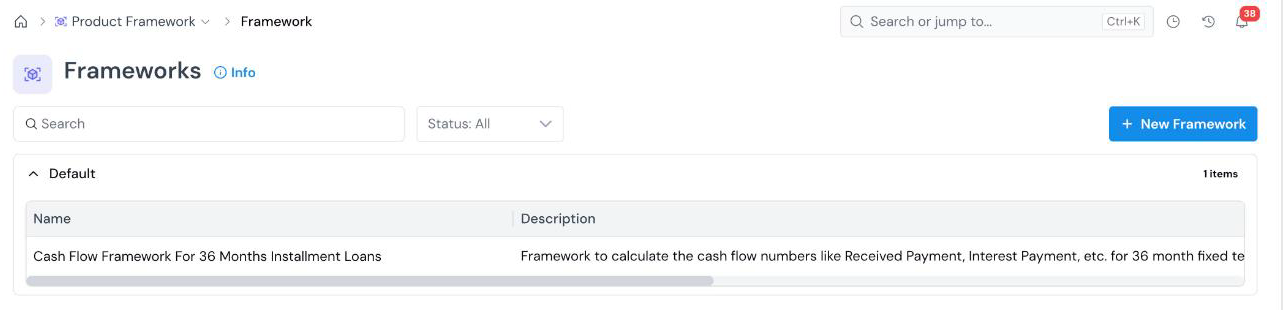
The registry lists frameworks by Group, with Name, Description, Created Date, Created By, and Status columns. Use the search box and the Status filter to narrow the list.
The form opens with an editable name at the top left (New Framework). Click the pencil icon and type a descriptive name.
Fill in Framework Information
Section titled “Fill in Framework Information”
Fill in Framework Information
Section titled “Fill in Framework Information”| Field | What it holds |
|---|---|
| Group Required | The group the framework is filed under. See Organize Objects. |
| Alias Required | The name used to refer to the framework in code (for example, cash_flow_framework). See Common Registration Info. |
| Description Required | What the framework calculates. Type / for headings and lists, and @ to insert a link to another platform object. |
Define the Inputs
Section titled “Define the Inputs”
Define the Inputs
Section titled “Define the Inputs”Under Definition → Inputs, click Add Input once for each value the calculation needs. Each input has three required fields:
| Field | What it holds |
|---|---|
| Name Required | A readable label (for example, Loan Amount). |
| Alias Required | The variable name the definition uses (for example, loan_amount). |
| Type Required | The data type: Numerical, String, DateTime, Boolean, Array[..], Map[..,..], or Struct[..]. Use an array type for a value per period, such as Array[Numerical] for monthly probabilities. |
Write the Definition
Section titled “Write the Definition”
Write the Definition
Section titled “Write the Definition”In the Definition editor, write the calculation in Python. Each input is in scope under its alias. Return the result of the calculation.
For example, a cash flow framework reads its inputs and returns one list per schedule column:
term = int(loan_term)if interest_rate is None or loan_amount is None or term is None: return { "beginning_balance": [], "ending_balance": [], "interest_payment": [], "principal_payment": [], }
Create
Section titled “Create”
Create
Section titled “Create”Click Create at the bottom right. The Framework is saved as a draft, at Version 1, and you land on its details page.
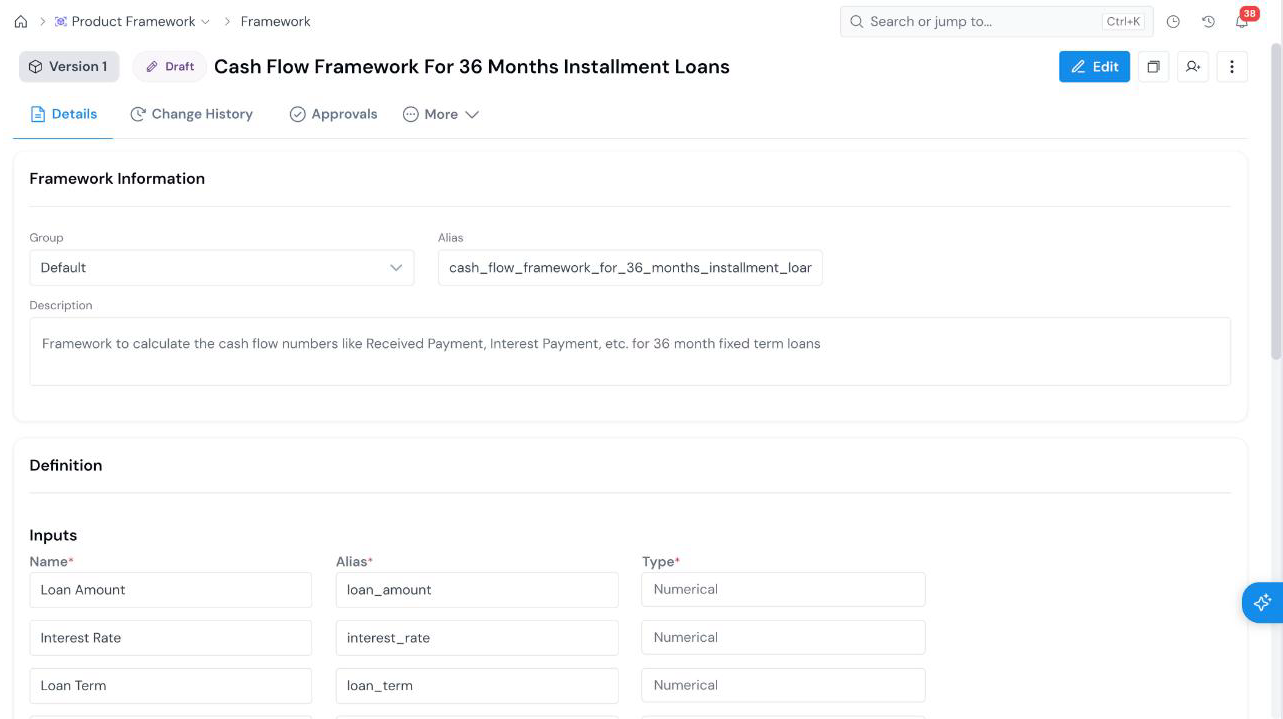
The framework details page
Section titled “The framework details page”- Details: Framework Information and the Definition (inputs and code).
- Change History: the record of edits.
- Approvals: where you send the framework for review. See Approve an Object.
- More: additional tabs for the object.
What’s Next
Section titled “What’s Next”- Approve an Object to move the Framework from Draft to Approved.
- Register a Product to define the product whose parameters feed the framework.
- Share an Object to give a colleague access to a draft.
Was this page helpful?
Thanks for the feedback.